 EN
 Français
 Español
 Deutsch
 Italiano
 Polski
 Ελληνικά
 Português
 Nederlands
 Türkçe
 Magyar
 Română
 Čeština
 Slovenčina
 Svenska
 Dansk
 Norsk
 Suomi
 Русский
 Hrvatski
 Srpski
 Eesti
 Latviešu
 Lietuvių
 日本語
 한국어
 中文
 العربية
VPN guide for Stake and Shuffle
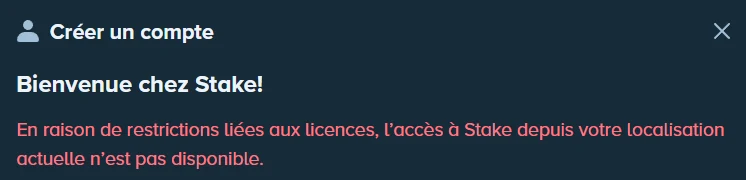
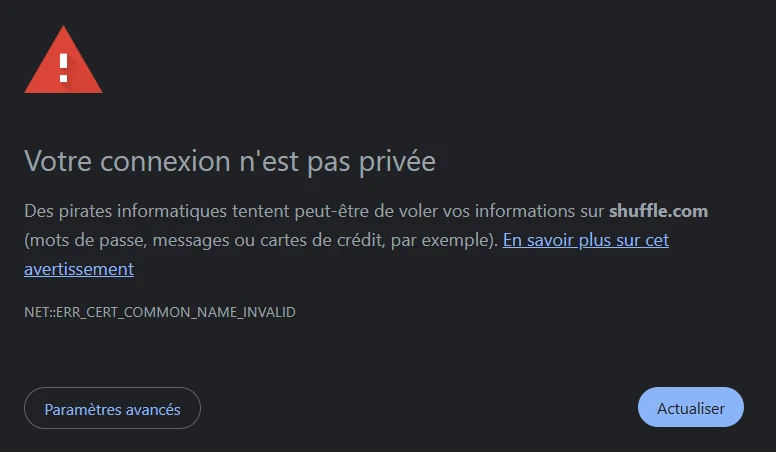
In some countries, Stake and Shuffle won’t open. With a free VPN connected to Norway, they open normally.
What you see without a VPN

The free VPN: Windscribe
Windscribe has a free plan: 2 GB a month, or 10 GB a month once your email address is confirmed. The Norway server is part of it.
- Windows
- Mac
- Android
- iPhone
The guide in 5 steps
- Download Windscribe from windscribe.com, the App Store or Google Play, on your phone or computer.
- Create a free account and confirm your email: you go from 2 GB to 10 GB a month.
- In the list of countries, pick Norway, then tap the connect button.
- Once connected, open Stake or Shuffle with the buttons below.
- Keep the VPN connected the whole time you play.
Open Stake or Shuffle
Play at StakePartner link · 18+

Play at ShufflePartner link · 18+

VPN questions
Why Norway?
Stake and Shuffle open normally from Norway, and the Norway server is included in Windscribe’s free plan.
Is the free VPN enough to play?
Yes. With your email confirmed you get 10 GB a month. Classic tables use little data; live tables, streamed as video, use more.
Do I need a VPN everywhere?
No, only where Stake or Shuffle won’t open. Everywhere else, the buttons on our casino page work directly.